Performance Tuning
Start by finding the bottleneck. Firecube tuning is usually straightforward once you know whether time is going into preprocessing, writes, staged upload, validation, or memory pressure.
For safe concurrency models, see Parallelism. For measured workload examples, see Benchmarks.
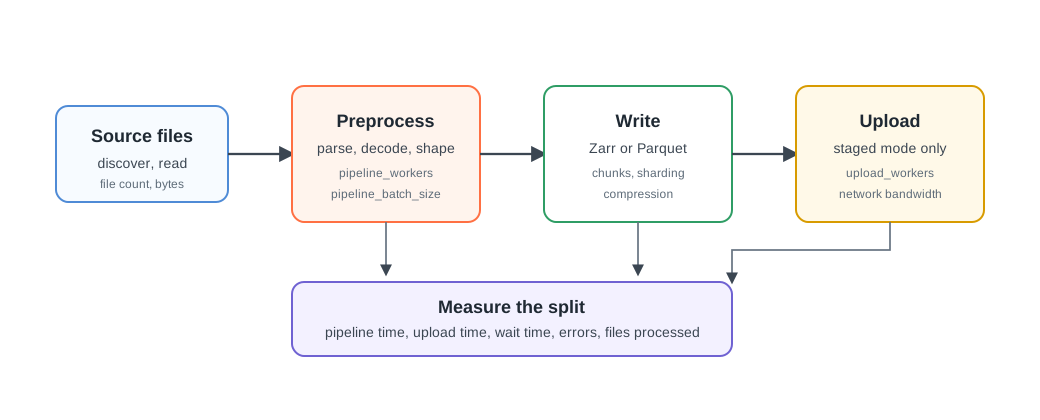
Measure First
Run a representative source window, then compare:
- total run duration;
- pipeline duration;
- staged upload duration;
- non-CPU wait time;
- files processed;
- storage errors;
- failed batches.
Firecube pushes these as end-of-run metrics when Pushgateway is configured. See Metrics for the model and Observability Reference for metric names.
If Preprocessing Is Slow
Preprocessing includes source discovery, parsing, decompression, transformation, and shaping batches before the write step.
Use pipeline workers when this phase dominates:
Increase workers gradually. If CPU usage is already high, more workers may add
contention without improving throughput. If memory grows too much, reduce
pipeline_batch_size or worker count.
If Zarr Writes Are Slow
For GenericZarrIngestor, source preparation can run in parallel but appends to
one Zarr group are serialized. More pipeline_workers will not make one append
writer concurrent.
Start with these checks:
- align
pipeline_batch_sizewith the Zarr time chunk size; - use
--write-mode stagedwhen S3 direct writes are dominated by per-chunk round trips and you have enough local scratch space; - use Zarr sharding when large grids create too many small objects;
- choose compression from the bottleneck: disable it when CPU is the bottleneck, enable it when upload size is the bottleneck;
- prefer
dask_scheduler=synchronouswhen pipeline workers are already active, so dask does not add another competing thread pool.
For append versus direct-region Zarr behavior, see Zarr. For multiple workers writing one Zarr group, see Parallel Zarr Writes.
Parquet Tuning
When Parquet writes are slow, start with the file layout. Parquet batches write
independent files, so GenericParquetIngestor can benefit from pipeline workers
during both preparation and file writes.
Use larger batches when you are producing too many tiny files. Use partitioning when downstream readers need predicate pushdown:
Use parquet_row_group_size when reader performance depends on row-group
granularity. Start with the pyarrow default unless you have a concrete reader
problem.
If Staged Upload Is Slow
Staged mode writes to a local workspace first, then uploads to the final target after the pipeline completes. If upload duration dominates, tune upload parallelism before changing pipeline workers:
Also check network bandwidth, object-store throttling, object count, and local workspace speed. For large Zarr products, sharding can reduce object count and make uploads less chatty.
If Validation Is Slow
firecube zarr validate can be expensive on stores with many chunks. Use a
budget when you need a bounded check:
uv run firecube zarr validate \
--product file:///data/products/MY_PRODUCT.zarr \
--group MY_GROUP \
--max-chunks 10000 \
--on-timeout warn
Use --on-timeout fail for CI or post-ingest gates that must fail when the
validation budget is exceeded.
If Memory Is Tight
Memory pressure usually comes from batch size, worker count, source decoding, or compression. Reduce the shape of in-flight work first:
- lower
pipeline_batch_size; - lower
pipeline_workers; - avoid unnecessary compression when CPU and memory are tight;
- use a fixed workspace path with enough disk when staged writes are enabled.
Do not tune memory by guessing. Run a smaller source window and scale one setting at a time.
Common Starting Points
For a large gridded Zarr product on S3 with scratch space:
--write-mode staged \
--option dask_scheduler=synchronous \
--option zarr_sharding=true \
--option pipeline_batch_size=10 \
--option upload_workers=4
For CPU-heavy source parsing:
For tabular Parquet output:
--output-format parquet \
--option pipeline_parallel=true \
--option pipeline_workers=4 \
--option pipeline_batch_size=50
Next Steps
- Benchmarks — compare measured workload profiles
- Parallelism — choose safe concurrency
- Metrics — inspect timing and throughput signals
- Zarr — choose append, direct region, and Zarr write settings
- Observability Reference — complete metric names and environment variables