Storage & ChunkManager
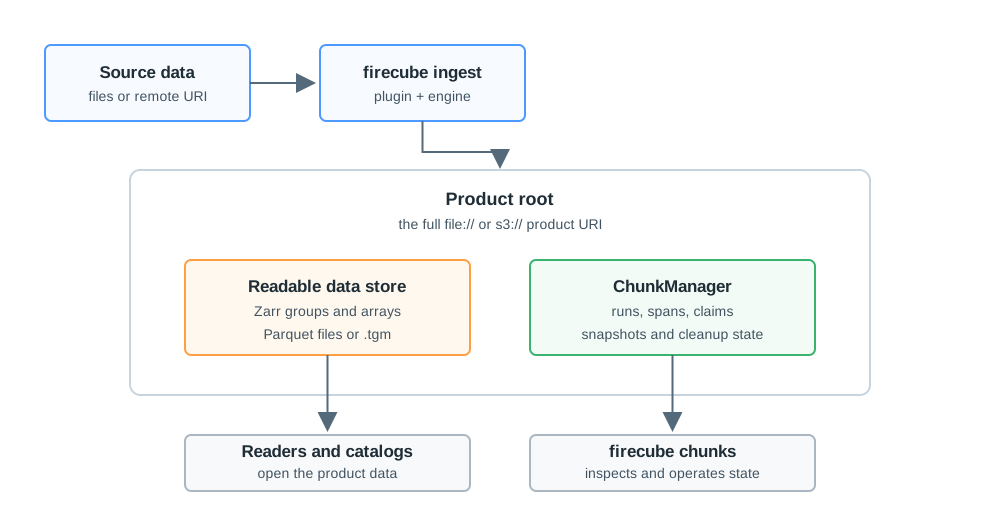
Every Firecube product has two parts: the data store users read and the ChunkManager records Firecube uses to keep the product inspectable, retryable, and safe to operate.
The data store is the Zarr store, Parquet dataset, or Tensogram file. ChunkManager records run history, spans, write claims, snapshots, and cleanup state for that same product.
When To Use This Section
- You need to choose between a local
file://target and ans3://target. - You need to choose the storage driver or write mode for an ingest run.
- You want to understand what
firecube chunksis showing before operating a product. - You are moving, copying, archiving, or restoring a product and need to keep Firecube lifecycle state with it.
How To Think About It
The product URI points to one product root:
Inside that product root, Firecube writes product data and ChunkManager records for the same run. Keep them together when you want Firecube to resume, inspect, recover, or clean up the product later.
ChunkManager records are not physical Zarr chunks. A ChunkManager record is a Firecube lifecycle record about runs, spans, claims, or snapshots. A Zarr chunk is a physical array shard inside a Zarr store.
Next Steps
- Product Storage — choose local/S3 storage, driver, and write mode
- ChunkManager Records — understand runs, spans, claims, and snapshots
- ChunkManager Operations — inspect, recover, delete, rebuild snapshots, or migrate a product
- Storage Driver Compatibility — compare fsspec and obstore support