Orchestration
Firecube does not schedule jobs. It gives you an explicit firecube ingest
command that can be started by your external orchestrator.
An external orchestrator is whatever starts the command: a shell, scheduled job, container entry point, CI step, or workflow system. It decides when commands start. Firecube decides whether each command is safe to run against the product it finds.
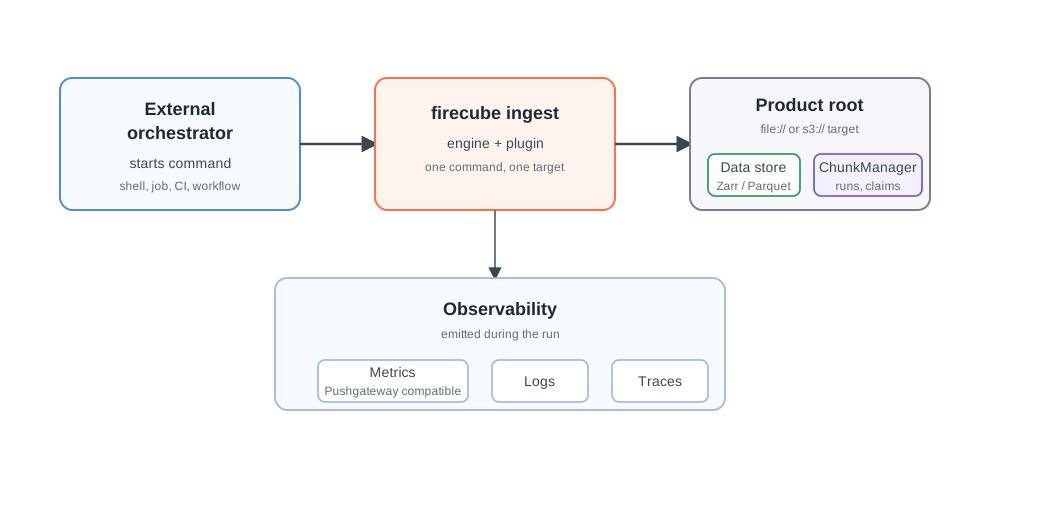
When To Use This Section
- You want to run Firecube from a scheduler, CI job, container, or workflow system.
- You need to know what the external orchestrator owns and what Firecube owns.
- You want to decide what can run concurrently.
- You need retry behavior that does not corrupt product state.
The Basic Rule
Keep the firecube ingest command explicit and portable. The same command shape
should work whether it is started by a local shell, a container entry point, or
a larger workflow system:
uv run firecube ingest <plugin> \
  --source /data/source \
  --target file:///data/products/MY_PRODUCT.zarr \
  --product-name MY_PRODUCT \
  --storage-type local \
  --storage-driver fsspec \
  --output-format zarr \
  --write-mode direct
Then let the external orchestrator handle scheduling, dependencies, resources, secrets, and log collection around that command.
Next Steps
- Orchestrator Contract — split ownership between the external orchestrator and Firecube
- Execution Shapes — choose a shell, scheduled job, container step, or workflow system
- Scheduling And Write Safety — decide what can run concurrently and what must be serialized
- Retries And Recovery — handle failed commands and safe retries
- Parallelism — choose workers and write domains by plugin class
- ChunkManager Operations — inspect or recover stuck runs and claims