Concepts
Use these pages to understand how Firecube reads source products, writes outputs, keeps runs recoverable, and fits into operations. For a first run, start with the Quickstart. For complete command and configuration surfaces, use the Reference.
Choose Where To Start
- Configuration Model — understand CLI flags, config files, environment variables, and plugin options.
- Plugins — choose or build the product-specific code that reads source data and shapes output.
- Output Formats — choose Zarr, Parquet, or Tensogram from the shape of the product.
- Storage & ChunkManager — understand product storage, resume state, write coordination, inspection, and cleanup.
- Orchestration — run Firecube from CI, cron, containers, or an orchestrator.
- Observability — inspect metrics first, then logs, then traces.
- Best Practices & Performance — choose production defaults, tune performance, and pick a safe parallel model.
How Firecube Works
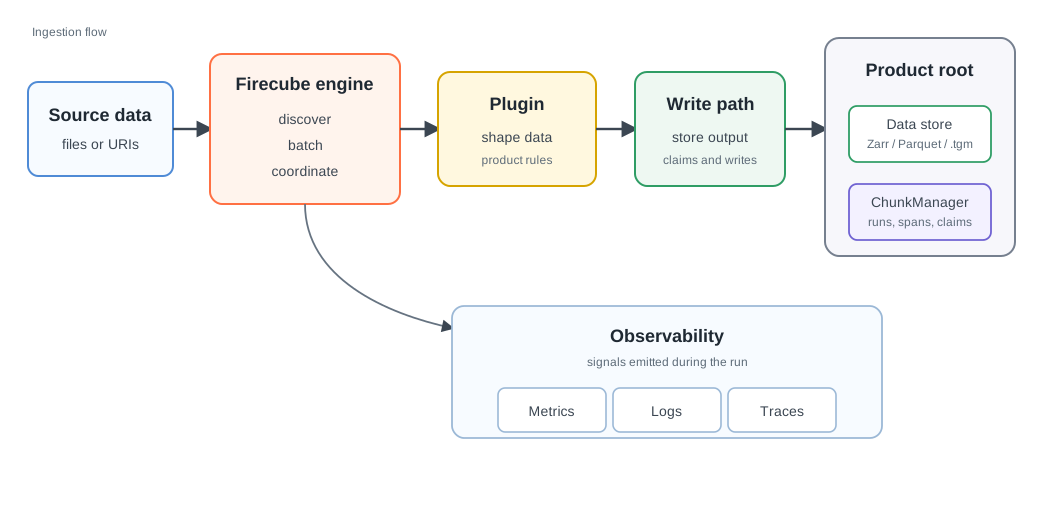
Firecube separates product-specific code from ingestion operations. The plugin knows the dataset. The engine owns discovery, batching, parallel execution, storage writes, resume checks, cleanup state, and observability.
Core Ideas
- Plugins describe the product. They read source items and shape arrays, records, coordinates, variables, and product-specific options.
- The engine handles the operational work. Firecube owns discovery, batching, workers, storage writes, resume checks, cleanup, and telemetry.
- Output format follows data shape. Use Zarr for gridded datacubes, Parquet for tabular records, and Tensogram for packaging finished Zarr products.
- ChunkManager keeps product lifecycle inspectable. It records runs, spans, claims, and snapshots so products can be resumed, inspected, recovered, and cleaned up.
- Parallelism depends on the write model. Pipeline workers, Parquet file writes, Zarr group fan-out, and direct-Zarr slot ranges have different safety rules.
Next Steps
- Glossary — check Firecube terms without reading every concept page.
- Plugins — understand the product-specific side of an ingestion.
- Output Formats — choose the product shape and write path.
- Storage & ChunkManager — understand product state, recovery, claims, and cleanup.
- Orchestration — run Firecube from another scheduler or workflow system.
- Observability — inspect metrics, logs, and traces.
- CLI Reference — check the complete command surface.