Orchestrator Contract
The external orchestrator starts Firecube commands. Firecube runs ingestion and protects the product while that command is active.
This boundary is what makes Firecube portable: you do not need a Firecube scheduler integration. You need something outside Firecube that can start a CLI command with the right environment, storage access, and resources.
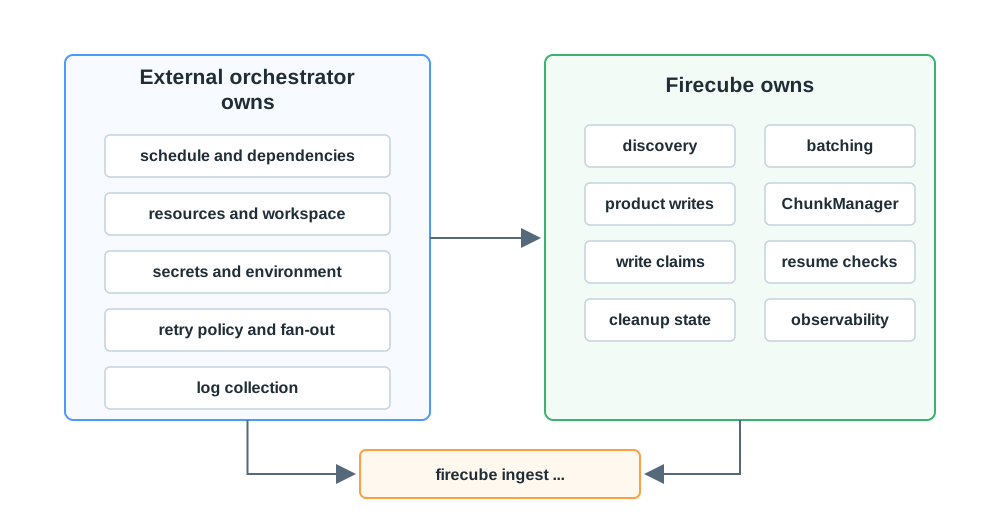
External Orchestrator Owns
- Starting the command at the right time.
- Passing CLI flags, config files, and environment variables.
- Injecting credentials without putting secrets on the command line.
- Providing CPU, memory, workspace, network, and storage access.
- Deciding retry policy after a command exits.
- Fan-out across independent products, groups, partitions, or slot ranges.
- Capturing logs and keeping command output available.
Firecube Owns
- Source discovery inside the command.
- Batching and pipeline workers.
- Product writes through the selected storage driver.
- ChunkManager records for runs, spans, claims, snapshots, and cleanup state.
- Resume checks before writing.
- Write-safety checks for claims and direct-Zarr slot ranges.
- Metrics, logs, and traces emitted by the command.
What Every Command Needs
Each firecube ingest command still needs the normal runtime inputs:
- plugin name
- source path or URI
- product URI target
- product name
- storage type and driver
- output format and write mode
- plugin-specific options, when required
Use Run Ingestion for runnable examples and CLI Reference for the complete command surface.
Next Steps
- Execution Shapes — choose how the command is started
- Scheduling And Write Safety — decide what can run in parallel
- Configuration Model — check CLI, config file, and environment precedence
- Observability — connect logs, metrics, and traces to external orchestrator jobs