Parallel Zarr Writes
Parallel Zarr writes are the scale-out path for DirectZarrIngestor plugins.
They split one fixed-layout Zarr group into time-index ranges so several workers
can write the same product without touching the same physical chunks.
User Story
You know the final Zarr layout and every source item maps to a deterministic
time index. One worker can write the product, but it is too slow for the full
time window. Instead of changing the product shape, you split the time axis into
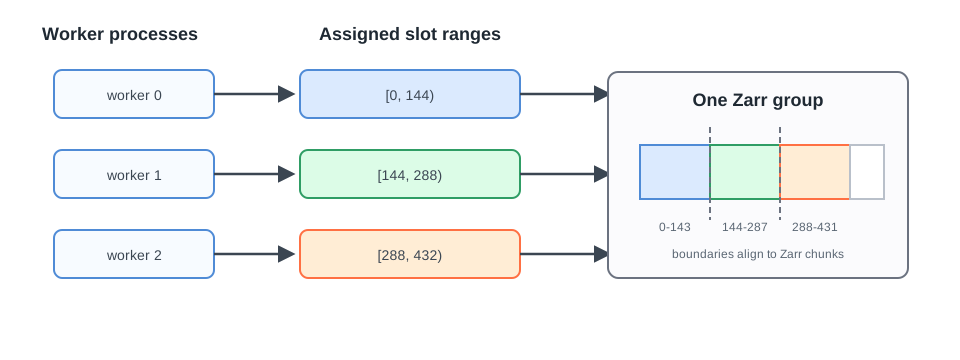
slot ranges: worker 0 writes [0,144), worker 1 writes [144,288), and so on.
Firecube plans and checks those ranges. You start one firecube ingest process
per slot; Firecube does not choose or manage the scheduling system. ChunkManager
records each worker's run state, claims, and coverage so retries and recovery
stay inspectable. See Orchestration for the scheduling
model.
What Firecube Provides
firecube zarr preallocatecreates or validates the shared Zarr schema.firecube zarr slotsemits executable slot ranges as JSON.--slot-start,--slot-end, and--slot-groupbind each worker to one range.- ChunkManager claims and run records block overlapping or stale writes.
Before You Start
Parallel Zarr writes fit only when all of these are true:
- the plugin uses
DirectZarrIngestor; - the plugin declares
SUPPORTS_SLOT_RANGE_PARALLELISM = True; - source items map deterministically to time indexes;
- the Zarr store shape is known up front;
- slot boundaries align to the Zarr time chunk size.
Do not use slot flags with GenericZarrIngestor or GenericParquetIngestor.
Append-Zarr writes scale by separate products or groups. Parquet already writes
independent files.
Workflow
1. Preallocate The Store
For production runs, create or validate the Zarr schema before launching workers:
firecube zarr preallocate <your_plugin_name> \
  --target file:///data/products/MY_PRODUCT.zarr \
  --product-name MY_PRODUCT \
  --storage-type local \
  --storage-driver fsspec \
  --write-mode direct
The command is idempotent. If the existing arrays do not match the plugin's declared schema, Firecube fails instead of resizing or overwriting them.
2. Plan Slot Ranges
Use firecube zarr slots to generate executable worker ranges:
firecube zarr slots <your_plugin_name> \
  --target file:///data/products/MY_PRODUCT.zarr \
  --product-name MY_PRODUCT \
  --storage-type local \
  --storage-driver fsspec \
  --write-mode direct \
  --slot-size 144
The output is JSON. Each entry in ranges contains the environment variables
and CLI arguments for one worker:
{
  "product_name": "MY_PRODUCT",
  "target": "file:///data/products/MY_PRODUCT.zarr",
  "groups": [
    {
      "name": "data",
      "total_slots": 576,
      "slot_size": 144,
      "remaining_ranges": [[0, 576]],
      "blocked_ranges": []
    }
  ],
  "ranges": [
    {
      "group": "data",
      "slot_start": 0,
      "slot_end": 144,
      "env": {
        "FIRECUBE_SLOT_START": "0",
        "FIRECUBE_SLOT_END": "144",
        "FIRECUBE_SLOT_GROUP": "data"
      },
      "cli_args": [
        "--slot-start", "0",
        "--slot-end", "144",
        "--slot-group", "data"
      ]
    }
  ]
}
By default, planning is resume-aware: completed ranges recorded by ChunkManager
are excluded from remaining_ranges. Use --no-resume only when you explicitly
want the full range regardless of existing coverage.
3. Launch Workers
Each worker runs normal firecube ingest with its assigned slot range:
firecube ingest <your_plugin_name> \
  --source /data/source \
  --target file:///data/products/MY_PRODUCT.zarr \
  --product-name MY_PRODUCT \
  --storage-type local \
  --storage-driver fsspec \
  --output-format zarr \
  --write-mode direct \
  --slot-start 0 \
  --slot-end 144 \
  --slot-group data
Ranges are half-open: [slot_start, slot_end). A worker with
--slot-start 0 --slot-end 144 owns indexes 0 through 143.
For multi-group plugins, pass --slot-group so Firecube knows which group the
worker owns. Single-group plugins may omit it.
4. Drive Slots From Environment Variables
If your runner assigns task indexes, Firecube can derive the slot range from the environment. Resolution order is:
- CLI
--slot-startand--slot-end FIRECUBE_SLOT_STARTandFIRECUBE_SLOT_ENDJOB_COMPLETION_INDEXandFIRECUBE_SLOT_SIZE- no slot range
With FIRECUBE_SLOT_SIZE=144 and task indexes 0..3, the workers own
[0,144), [144,288), [288,432), and [432,576).
5. Verify And Recover
Use ChunkManager operations to inspect worker state:
firecube chunks runs list \
  --product-name MY_PRODUCT

firecube chunks claims list \
  --product-name MY_PRODUCT
Only abandon a run or delete a span after verifying that no worker is still active. See ChunkManager Operations for the recovery commands.
Slot Safety Rules
Firecube fails closed when it cannot prove the writes are safe:
- overlapping slot ranges are rejected;
- write intents outside the assigned range fail before writing;
- slot boundaries that cut through a physical Zarr chunk are rejected;
- stale active runs or claims remain blocking until an operator clears them.
This matters because Zarr chunks are physical array storage units. If two workers write different slot ranges that touch the same physical Zarr chunk, the writes can conflict. Slot sizes should be multiples of the Zarr time chunk size.
Inspect the chunk size with:
Fail-Closed Planning Behavior
firecube zarr slots fails before emitting JSON when planning would silently
drop work or when resume-aware coverage cannot be read.
| Failure | Meaning | Recovery |
|---|---|---|
blocked_ranges is not empty |
Existing coverage or requested slots are not chunk-aligned | Inspect the producing run, then preview and commit span deletion with firecube chunks delete-span --product-name <product-name> --run-id <run_id> --force --dry-run and then --yes-i-really-mean-it. Re-ingest with --option force_reingest=true. |
resume-aware coverage lookup failed |
ChunkManager coverage could not be read | Fix the storage/auth/corruption issue. Use --no-resume only when you deliberately want to ignore existing coverage. |
If a blocked range is a terminal stub past the declared total, fix the plugin's expected time count instead of deleting valid data.
Troubleshooting
| Symptom | Meaning | Fix |
|---|---|---|
ConfigurationError: plugin does not declare SUPPORTS_SLOT_RANGE_PARALLELISM = True |
The plugin has not opted into slot workers | Use a slot-capable DirectZarrIngestor plugin. |
WriteIntentRangeError |
The plugin emitted a write outside this worker's slot | Fix the plugin's slot filtering or time-index mapping. |
RangeOverlapError |
Another active run owns an overlapping range | Wait for it to finish, or abandon it only after confirming it is stale. |
| Schema mismatch during preallocate or ingest | Existing Zarr arrays do not match the plugin schema | Fix the schema or target, then rerun preallocate. |
| Worker writes zero items | This slot has no source data | Expected for sparse products. |
Limitations
- Slot workers require a fixed Zarr shape and deterministic time indexes.
- Slot boundaries must align to the Zarr time chunk size.
- Each worker owns a time-index range; spatial overlap is safe only when the plugin's write intents still target disjoint physical Zarr chunks.
- Firecube emits the slot plan and enforces write safety, but your runner launches and supervises the workers.
- Schema changes during a parallel run are not supported. Preallocate first when the target is shared by many workers.
Next Steps
- DirectZarrIngestor (Region) — understand the direct region write model
- DirectZarrIngestor — implement plugin hooks
- Direct Parallel Zarr Tutorial — build and run a slot-capable plugin
- ChunkManager Operations — inspect claims, runs, and recovery state
- CLI Reference — complete slot and ingest flags