NetCDF To Zarr
Goal
Understand how the weather_netcdf plugin from the quickstart turns four
NetCDF files into one Zarr product. You will inspect the plugin contract, read
the source files, and verify the stored values.
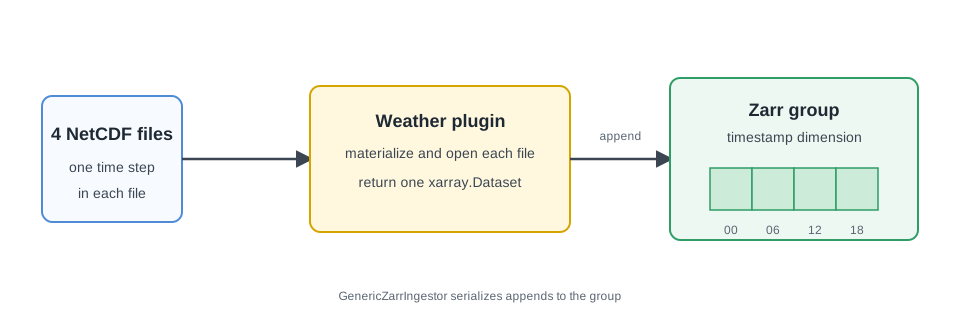
xarray.Dataset; GenericZarrIngestor appends it to the Zarr group.Prerequisites
- Complete the quickstart through Run Ingestion.
- Keep the quickstart virtual environment active.
- Run every command from the
firecube-quickstart/directory.
The completed quickstart provides the plugin source under plugins_dev/, four
files under quickstart-data/, and the Zarr product under
quickstart-output/.
1. Review The Plugin Contract
Print the plugin implementation:
The generated class and the build_dataset method each own one part of the
contract:
@register_ingestor("weather_netcdf")defines the name used byfirecube ingest.PRODUCT_NAMEsupplies the default logical product name.GenericZarrIngestordiscovers and batches source files, then appends the dataset returned bybuild_dataset.ctx.materialize(item)resolves each source item to a local path forxarray.xr.concat(...).sortby("timestamp")combines the four time steps in order.
The quickstart owns the complete plugin implementation. The GenericZarrIngestor guide explains how to adapt the same hook for another dataset.
2. Inspect The NetCDF Inputs
Open each source file and print the timestamp and grid size:
python - <<'PY'
from pathlib import Path

import xarray as xr

paths = sorted(Path("quickstart-data/weather-netcdf").glob("*.nc"))
assert len(paths) == 4

for path in paths:
    with xr.open_dataset(path) as dataset:
        timestamp = dataset["timestamp"].values[0]
        print(path.name, timestamp, dict(dataset.sizes))
        assert dataset.sizes == {"timestamp": 1, "latitude": 2, "longitude": 3}
PY
Expected output contains one line for each file, ordered from
weather_01.nc through weather_04.nc. Each file has one timestamp on the
same 2 by 3 grid.
3. Verify The Zarr Product
Open the default Zarr group and read the temperature at the first grid
point:
python - <<'PY'
import numpy as np
import xarray as xr

dataset = xr.open_zarr(
    "quickstart-output/weather.zarr",
    group="default",
    consolidated=False,
)
values = dataset["temperature_c"].isel(latitude=0, longitude=0).values

print(dataset)
print(values.tolist())

assert dataset.sizes == {"timestamp": 4, "latitude": 2, "longitude": 3}
assert np.allclose(values, [19.4, 22.8, 27.3, 24.1])
PY
Expected output includes:
The four values keep the timestamp order defined in the source files. The
result also contains humidity_pct and Firecube's timestamp-state array.
4. Inspect The Run Record
List the control-plane record stored beside the product:
The table should contain a span record for the completed
quickstart_weather ingestion. These are logical Firecube records, not
physical Zarr array chunks.
What Firecube Handled
- Recursive NetCDF discovery from
--input-data - Batch creation
- Serialized Zarr appends for the
defaultgroup - Product-local run and span records
- Basic run metrics and logs
The plugin only supplied the dataset-specific read and combination logic.
Troubleshooting
| Symptom | Cause | Fix |
|---|---|---|
Plugin 'weather_netcdf' not found |
The quickstart environment is inactive or the editable install is missing. | Run source .venv/bin/activate, then repeat the install command from the plugin page. |
| A source-file assertion fails | The four quickstart NetCDF files are missing or changed. | Repeat Prepare Source Data. |
quickstart-output/weather.zarr is missing |
The quickstart ingestion has not completed. | Repeat Run Ingestion. |
| A changed plugin does not rewrite completed data | Firecube recognizes the source records from the earlier run. | Use a new target or pass --option force_reingest=true while developing. |
Next Steps
- NetCDF To Zarr: Source Discovery: extend the same plugin run to another NetCDF filename pattern.
- NetCDF To Zarr: Observability: add one custom metric to the same plugin.
- Sentinel-3 FRP To Parquet: download and ingest a real EUMETSAT product.
- DirectZarrIngestor (Region): learn the slot-write path for disjoint parallel writes.