Run Parallel Zarr Writes
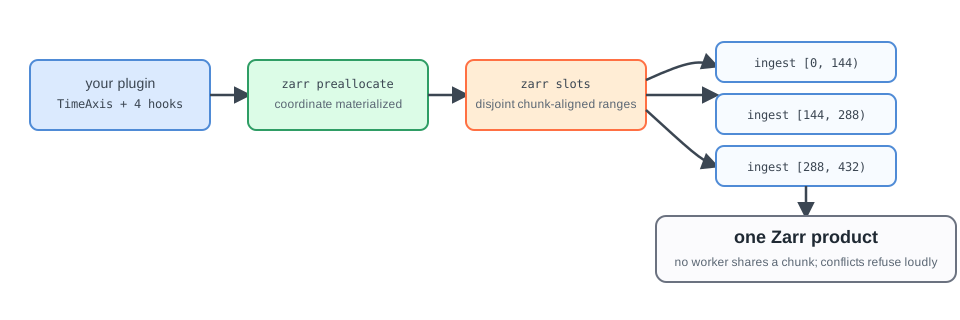
Use this workflow to run several DirectZarrIngestor workers against one Zarr
product. Each worker receives a disjoint, chunk-aligned range of indexes in one
group.
Firecube plans and validates the ranges. Your scheduler starts one
firecube ingest process for each range.
Before You Start
The plugin must:
- subclass
DirectZarrIngestor; - declare
index_spec(ctx)with a regular time axis; - implement
inspect_item(item, ctx)to returnItemInfo(coordinate=...); - declare the complete Zarr schema;
- map source values to deterministic indexes through the resolved index.
See the DirectZarrIngestor guide for the plugin contract. Use Parallelism first if you have not yet chosen a write model.
1. Preallocate The Product
Create or validate the shared schema before starting workers:
firecube zarr preallocate <plugin> \
  --target file:///data/products/my_product.zarr \
  --product-name my_product \
  --storage-type local \
  --storage-driver fsspec \
  --write-mode direct
The command is idempotent when the existing arrays match the declared schema. It fails when their shape, data type, or chunk layout differs.
If the plugin declares a TimeAxis.observed axis, the coordinate values come
from the source data, not from the declaration. Materialize them before
starting workers by passing --input-data and the slot window to the same
command:
firecube zarr preallocate <plugin> \
  --target file:///data/products/my_product.zarr \
  --product-name my_product \
  --storage-type local \
  --storage-driver fsspec \
  --write-mode direct \
  --input-data /data/source \
  --slot-start 0 \
  --slot-end 432
Workers refuse to write into slots whose coordinate is still unmaterialized,
so a skipped window surfaces as a loud per-slot error, never as silent data
misplacement. TimeAxis.grid and TimeAxis.explicit axes are filled from
the declaration alone and skip this step.
Add --dry-run to inspect the resolved index without writing any files or
control-plane records:
firecube zarr preallocate <plugin> \
  --target file:///data/products/my_product.zarr \
  --product-name my_product \
  --storage-type local \
  --storage-driver fsspec \
  --write-mode direct \
  --dry-run
The dry-run output is the same JSON format as firecube zarr index show --json.
No Zarr arrays, claim files, or index records are created.
2. Plan Slot Ranges
Inspect a human-readable plan before launching workers:
firecube zarr slots <plugin> \
  --target file:///data/products/my_product.zarr \
  --product-name my_product \
  --storage-type local \
  --storage-driver fsspec \
  --write-mode direct \
  --slot-size 144 \
  --format table
Each row contains a group and a half-open range such as [0, 144). The slot
size must align with the indexed dimension's chunk size. Omit --format table
to receive the JSON plan used by schedulers.
Planning is resume-aware by default: completed ranges are excluded. Use
--no-resume only when the scheduler must deliberately ignore recorded
coverage and emit the full range.
The JSON plan also names one range per group as the static owner. Read it with:
firecube zarr slots <plugin> \
  --target file:///data/products/my_product.zarr \
  --product-name my_product \
  --storage-type local \
  --storage-driver fsspec \
  --write-mode direct \
  --slot-size 144 \
  --format json | jq '.groups[0].static_owner'
Use this value in step 3 so exactly one worker writes static arrays such as latitude and longitude grids.
3. Start One Worker Per Range
Scale this workflow by starting more slot-assigned processes. Keep
pipeline_workers=1 within each process so one worker owns each range.
Pass one planned range to each ingestion process:
firecube ingest <plugin> \
  --input-data /data/source \
  --target file:///data/products/my_product.zarr \
  --product-name my_product \
  --storage-type local \
  --storage-driver fsspec \
  --output-format zarr \
  --write-mode direct \
  --option pipeline_workers=1 \
  --slot-start 0 \
  --slot-end 144 \
  --slot-group <group>
A worker assigned [0, 144) owns indexes 0 through 143. For a single-group
plugin, --slot-group can be omitted.
Write Static Arrays Once
Static arrays do not move with the time axis, so by default every worker
rewrites them. To restrict them to one worker, add two flags to every worker
command, using the static_owner value from the plan in step 2:
firecube ingest <plugin> \
  --input-data /data/source \
  --target file:///data/products/my_product.zarr \
  --product-name my_product \
  --storage-type local \
  --storage-driver fsspec \
  --output-format zarr \
  --write-mode direct \
  --option pipeline_workers=1 \
  --slot-start 144 \
  --slot-end 288 \
  --suppress-static-emission-for-non-owner \
  --static-owner-slot-start 0
The worker whose --slot-start equals --static-owner-slot-start writes the
static arrays and stamps their markers. Every other worker skips them and logs
one warning per skipped write. static_owner holds one value per group, so
give each worker run a single --slot-group when owners differ between
groups.
Derive Ranges From A Scheduler Index
An indexed scheduler can assign ranges without constructing the slot flags. Set the task index and slot size for each process:
export JOB_COMPLETION_INDEX="0"
export FIRECUBE_SLOT_SIZE="144"

firecube ingest <plugin> \
  --input-data /data/source \
  --target file:///data/products/my_product.zarr \
  --product-name my_product \
  --storage-type local \
  --storage-driver fsspec \
  --output-format zarr \
  --write-mode direct \
  --option pipeline_workers=1 \
  --slot-group <group>
Task index 0 owns [0, 144), index 1 owns [144, 288), and so on. Explicit
--slot-start and --slot-end values take precedence over
FIRECUBE_SLOT_START and FIRECUBE_SLOT_END; those variables take precedence
over JOB_COMPLETION_INDEX with FIRECUBE_SLOT_SIZE or --slot-size.
4. Verify Worker Runs
Inspect the runs after the workers finish:
Every planned range should have a completed run. If a retry remains blocked, use ChunkManager Operations to inspect the product's claims.
Recover A Blocked Plan
Firecube refuses to emit or execute ranges when it cannot prove that the writes are disjoint and chunk-aligned.
| Failure | Action |
|---|---|
| The plan reports blocked ranges | Inspect the run that recorded the coverage. Delete a span only after confirming that no worker is active. |
| Coverage cannot be read | Fix the storage, authentication, or control-plane problem. Do not use --no-resume as a recovery shortcut. |
WriteIntentRangeError |
Fix the plugin's source filtering or index mapping; it emitted a write outside the worker's range. |
| An overlapping range is active | Wait for the other worker, or abandon it only after confirming that the run is stale. |
| Preallocation reports a schema mismatch | Use the intended target or align the plugin schema with the existing product. |
Use ChunkManager Operations for run, claim, and span recovery commands.
Next Steps
- Parallel Zarr Writes - understand the slot safety model
- DirectZarrIngestor (Region) Tutorial - build a direct-indexed plugin
- Scheduling And Write Safety - coordinate external workers
- CLI Reference - look up all slot and ingest flags