Plugin Development Overview
A Firecube plugin is a Python package that teaches Firecube how to turn source data into a product. Most plugins contain the product-specific reading and data shaping, while a Firecube template provides source discovery, batching, standard storage writes, run tracking, and recovery around that code.
This guide assumes Firecube is already installed. See Installation if you still need to set up an environment.
Want a complete worked example instead? The Quickstart creates and runs a local NetCDF-to-Zarr plugin. The NetCDF To Zarr tutorial then explains its conversion contract and verifies the stored values.
How Template Plugins Work
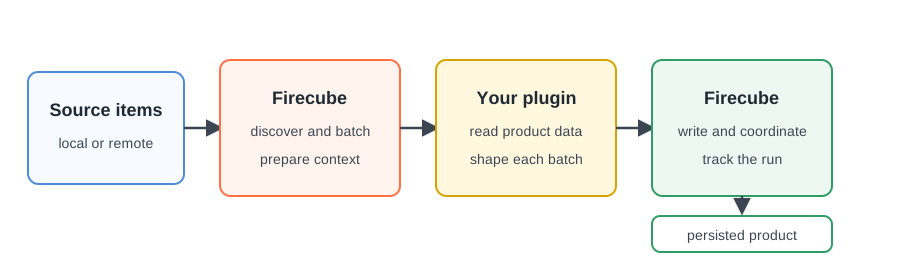
Most plugin authors use one of the three template classes. A template keeps the plugin focused on product data while Firecube uses its standard writer. A custom pipeline is available when none of those contracts represents the product.
Choose What Your Plugin Produces
| Product contract | Start with | Your plugin supplies |
|---|---|---|
| Complete, ordered multidimensional datasets | GenericZarrIngestor (Append) (concept) |
One xarray.Dataset for each group and batch; Firecube serializes appends to a group |
| Tables or data frames | GenericParquetIngestor (Tabular) (concept) |
One table or data frame for each group and batch |
| Zarr data with known indexed positions, especially when several workers must write one group | DirectZarrIngestor (Region) (concept) |
The array schema and write locations; for parallel workers, a fixed extent and deterministic index model |
| A product no template represents | Custom Pipeline Plugins — the advanced, manual contract; use it when the templates above don't fit | Processing, writing, results, and coordination |
The source file format does not determine the class. Choose the contract that matches the data your plugin can supply.
For Zarr, the important difference is how a write position is chosen.
GenericZarrIngestor finds the end of the group and appends the next complete
dataset, so mutations to that group pass through one serialized append path.
DirectZarrIngestor places writes at indexes supplied by the plugin. Its
optional parallel contract fixes the global extent first, then lets separate
ingest processes own disjoint, chunk-aligned ranges of the same group.
Choose DirectZarrIngestor only when exact placement or same-group slot
parallelism justifies the additional schema and indexing work. The class also
supports serial ingestion; selecting it does not enable parallel writes by
itself. Compare the Zarr write models
before implementing the plugin.
From An Idea To A First Run
- Choose the product contract. Use the table above to identify the public class that matches the data the plugin will supply.
- Create the plugin. The interactive command creates a Python package for the selected class.
- Install the plugin. Install it in development mode so Firecube can discover it while you edit the code.
- Discover the source data. Know how discovery selects and groups items before writing anything, and customize it if the defaults don't fit.
- Implement the template hooks. Follow the class guide linked from the table.
- Verify plugin discovery. Inspect the registered plugin and its available configuration.
- Run ingestion. Give the plugin source data and a product target, then verify the persisted output.
- Package and register the plugin. Declare the package entry point so Firecube can discover the plugin from installed metadata before you publish it.
Add configuration and telemetry after the plugin's main data-conversion method is working; source access and discovery come first, since real source data almost always needs custom discovery or grouping rather than the template defaults.
Next Steps
- Create a Plugin — create a package with the interactive command
- Zarr Write Models — compare sequential appends, direct writes, and optional parallel writes
- Quickstart — create and run a complete local plugin from source files to a verified Zarr product
- NetCDF To Zarr — inspect that plugin's conversion contract and stored values
- API Reference — look up the public types used by template plugins